Build an AI Agent That Actually Does Things

Build DeskBot a physical AI desk companion that checks your weather, sends WhatsApp messages, controls your smart home, and more. No coding experience needed.

Free to join · 11 video lessons · No coding required · Hardware kit under ₹3,000

Interactive Models
0
Video Lessons
0
Agent Skill
0 +
Coding Needed
The Problem

AI Can Think. But It Can't Act.

You ask ChatGPT to send an email, it writes one and tells you to go paste it yourself. The AI did the easy part. You still did the hard part.

ICN

Chatbot

Writes an email draft.
You send it manually.

ICN

DeskBot Agent

Writes, formats, and sends the email for you.

What You'll Build

A Physical AI Companion.
Doing Real Work.

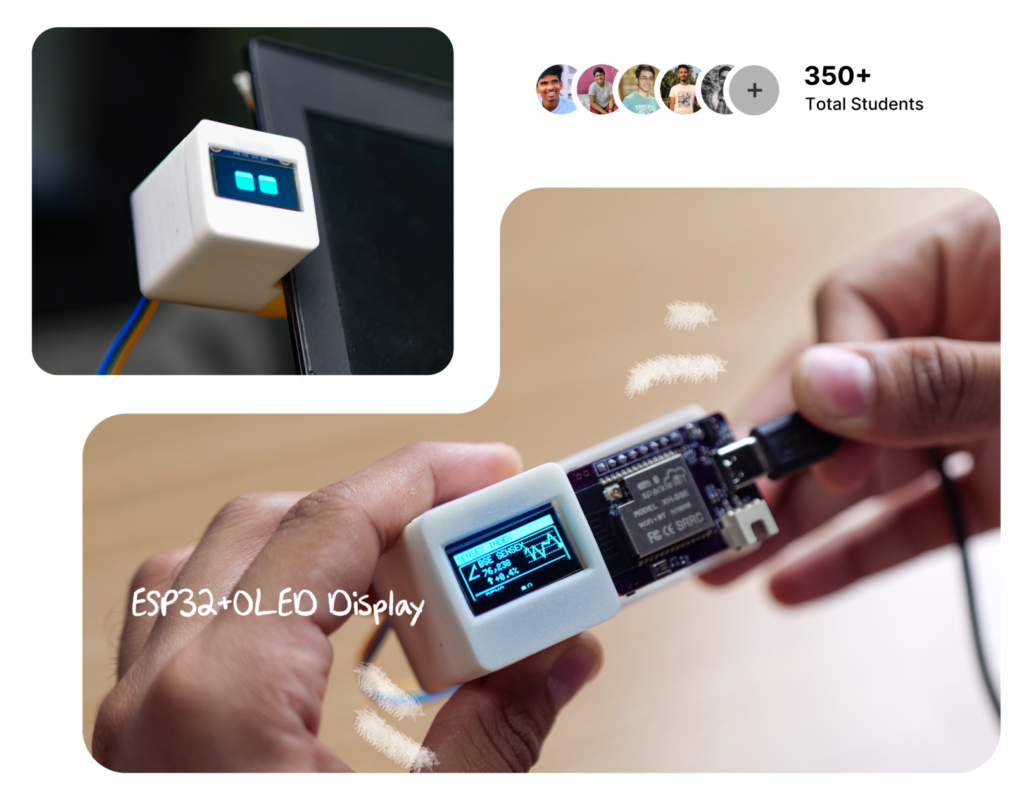
DeskBot is a small device that listens to your voice, thinks using AI, and takes action in the real world, checking weather, controlling your smart home, managing your calendar.

The Secret Sauce

The DOE Framework
How Real Agents Work

Most AI tutorials teach you to chat. This course teaches you the architecture behind agents that take action reliably every time.

Directive

Plain English instructions that tell the AI what to do, step by step.

The menu + recipes

Orchestrator

The AI brain that reads directives, makes decisions, and delegates to the right scripts. 

The head chef

Execution

Reliable scripts that do exactly one thing perfectly. Same input → same output

The line cooks

What You'll Build

From Zero to Working Agent
in 11 Videos

4.5 hours total. Every video builds on the last. By Video 7, DeskBot is on your desk doing real tasks.

View Full Course Roadmap

11 videos · 27 interactive modules · ~4.5 hours total

00
Foundations

The Language of Tech

13 concepts. Zero jargon. APIs, servers, JSON — all through real-world analogies. No code.

01–02
Philosophy + Framework

What Are Agents + The DOE Framework

Why AI can't act alone. The Directive-Orchestration-Execution pattern that fixes it. 3 live demos that will change how you see AI.

03
Hardware

Building DeskBot

Wire the ESP32, display, and speaker. Flash firmware. See DeskBot come alive on your desk.

04–05
First Build

Workshop + First Skill

Set up your dev environment. Build a weather checker with AI Copilot. See the full DOE loop fire.

06
Independence

The Local Server

Replace Copilot with a local server. DeskBot works 24/7 — VS Code closed, laptop lid shut.

07–08
The Payoff

Real-World Skills — 7+ Automations

Weather. WhatsApp. Google Sheets. Smart home. Morning briefings. Email. Calendar. Real APIs, real actions — not simulations.

09
Advanced

Memory, Pipelines & Self-Healing

Give DeskBot memory, parallel execution, and error recovery. Your agent becomes resilient.

10
Graduation

Build Your Own Agent

Design and build a custom agent from scratch. Get certified. Share your build with the community.

Early Access — Limited Spots

Don't Just Use AI.
Build With It.

Get notified when DeskBot launches. We'll send you the hardware shopping list immediately so you can start ordering parts today.

✦ Free to join
✦ No spam, ever
✦ Unsubscribe anytime
A
R
S
+
247 people already signed up
Student Reviews

What Our Students Say

★★★★★
Manas
Very different from traditional courses. Filled with action, humor, and comprehensive teaching. Vijay makes learning effortless through storytelling.
Manas Reddy RamidiEngineering Student
★★★★★
Tabrez
Do not doubt! As a beginner, I had tons of content to dig deep into — from CAD to IoT. I opened up many new worlds. You won't regret it.
Tabrez AhmedStudent
★★★★★
Gautham
A must-take course for engineers and professionals alike. Vijay does a brilliant job at explaining tough concepts and making them easy to understand.
Gautham AElectronics Engineer
Swipe, tap arrows, or use ← → keys

Frequently Asked Questions

Do I need to know how to code? +

No. This course is designed for non-programmers. The AI writes the code, you write the instructions in plain English. You'll learn to read code at a high level, but you won't write it from scratch.

What hardware do I need to buy? +

An ESP32 dev module, a small OLED display, a speaker with amplifier, breadboard, jumper wires, and a USB cable. Total cost is around ₹2,000–3,000. We provide a complete shopping list with links when you sign up.

Do I need a powerful computer? +

Any modern laptop or desktop works. The AI processing can run locally (with Ollama) or through cloud APIs (Groq, OpenAI, Claude). Windows, Mac, and Linux are all supported.

How long is the course? +

About 4–4.5 hours of video content across 11 lessons, plus 27 interactive modules. You can go at your own pace, most students finish in 2–4 weeks.

Is DeskBot just a toy, or can it do real work? +

Real work. By Video 7, DeskBot sends actual WhatsApp messages, writes to real Google Sheets, controls physical smart home devices, and reads your actual email. These aren't simulations — they're live API connections.

What's the DOE Framework? +

DOE stands for Directive-Orchestration-Execution. It's the architectural pattern that makes AI agents reliable. Directives are plain English instructions, the Orchestrator is the AI brain that makes decisions, and Execution scripts do the actual work.

Is this course free? +

Sign up for the early access list now — we'll share pricing and launch details directly to your inbox. You'll also get the hardware parts list immediately so you can start ordering.